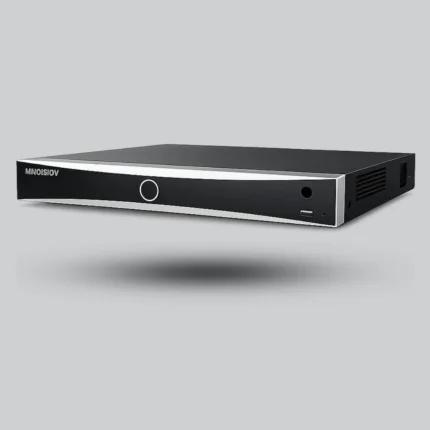



Hikvision DS-7616NXI-K2/16P 16-Channel PoE AcuSense 4K NVR

Product Manual

The Hikvision DS-7616NXI-K2/16P is a professional 16-channel PoE 4K NVR with 16 built-in PoE ports for easy plug-and-play camera connection. It supports AcuSense intelligent detection, H.265+ compression, 4K video output, and up to 16 TB per HDD, making it ideal for advanced security and surveillance systems.

Warranty 1 Year
Description
16IP camera channels
16Built-in PoE ports
200WTotal PoE power
4KHDMI output

Features & Design

AcuSense technology

Motion Detection 2.0 on all channels for human and vehicle recognition to reduce false alarms, plus facial recognition and Perimeter Protection on 2 channels by device.

16 Plug & Play PoE ports

16 built-in IEEE 802.3af/at PoE ports with up to 200W total power connect cameras directly, with no need for an external switch.

H.265+ and 4K output

H.265+ reduces storage space by up to 75%, with 4K HDMI output, an independent VGA output and synchronous playback of up to 16 channels.

Applications

  • Companies and offices
  • Villas and smart homes
  • Warehouses and factories
  • Malls and retail stores

How does the network video recorder work?

The recorder receives video from up to 16 IP cameras connected to its built-in PoE ports, records it to the HDD, analyses it with AcuSense, and is managed via an HDMI or VGA monitor or remotely via Hik-Connect.

Activate with a password

On first access, activate the recorder by creating an admin password; no operation is allowed before activation. It can also be activated via web browser, SADP or client software.

Add the cameras

Under Configuration, Camera, IP Camera, online cameras on the same network segment are listed; an inactive camera is activated automatically with the password set during device activation.

Link to Hik-Connect

Under Configuration, Network, Hik-Connect, enable the service and set a verification code, then scan the device QR code with the Hik-Connect app to bind it to your account.

Operating features

Facial recognition

Facial recognition on 1 video stream channel at 8MP or 4 channels of face picture comparison, with up to 16 libraries holding 20,000 face pictures in total.

Smart functions by camera

With cameras that support them, functions such as ANPR license plate recognition, VCA and throwing objects from building detection are available.

Smart search and secure streaming

Smart search in a selected area of the video and Smart Playback, with Stream over TLS encryption.

ImportantAccording to the datasheet, facial recognition, Motion Detection 2.0 and perimeter protection cannot be enabled at the same time.

Specifications & Details

Technical specifications

Device and channels

Model
DS-7616NXI-K2/16P
Device Type
16-ch PoE AcuSense 4K NVR
Channels
16 IP channels
Recording Resolution
Up to 12MP

Video and audio

Video Compression
H.265+ / H.265 / H.264+ / H.264
Bandwidth
Incoming 160 Mbps / Outgoing 160 Mbps
HDMI Output
1-ch, 4K (3840×2160)/30Hz
VGA Output
1-ch, 1920×1080/60Hz
Audio
Audio output 1 RCA / Two-way audio 1 RCA

Product details

Network, PoE and storage

Network Interface
1 × RJ45 10/100/1000 Mbps
PoE Ports
16 × RJ45 10/100 Mbps – IEEE 802.3af/at – ≤ 200W
Storage
2 SATA
USB Interface
1 × USB 2.0 front + 1 × USB 2.0 rear

Power and size

Power Supply
100~240VAC, 50~60Hz
Consumption
≤ 15W (without HDD, PoE off)
Working Temperature
-10°C ~ +55°C
Dimensions
385 × 315 × 52 mm
Weight
≤ 3 kg (without HDD)

Important technical noteAlarm 4 In / 1 Out, humidity 10% to 90%, up to 128 remote connections, ONVIF (Profile S/G), SDK and ISAPI. Certifications include CE, FCC, IC, CB, KC, UL, RoHS, Reach, WEEE, RCM, UKCA, LOA and BIS.

Installation tips

  1. Indoor location

    The recorder is designed for indoor use only; install it in a well-ventilated, dust-free environment without liquids.

  2. Secure mounting

    Secure the recorder properly to a rack or shelf; major shocks or dropping it may damage the sensitive electronics inside.

  3. Ventilation clearance

    Keep at least 200 mm of free space around the recorder and do not cover the ventilation openings.

  4. Power and HDD

    Connect the recorder to an earthed mains socket-outlet; using it with a UPS and a factory-recommended HDD is advised.

Indoor location

The recorder is designed for indoor use only; install it in a well-ventilated, dust-free environment without liquids.

Secure mounting

Secure the recorder properly to a rack or shelf; major shocks or dropping it may damage the sensitive electronics inside.

Ventilation clearance

Keep at least 200 mm of free space around the recorder and do not cover the ventilation openings.

Power and HDD

Connect the recorder to an earthed mains socket-outlet; using it with a UPS and a factory-recommended HDD is advised.

Frequently Asked Questions

Do I need an external PoE switch?

No, the recorder has 16 built-in IEEE 802.3af/at PoE ports with up to 200W total power to connect cameras directly.

Does it support facial recognition?

Yes, on 1 video stream channel or 4 channels of face picture comparison; it cannot run at the same time as Motion Detection 2.0 or perimeter protection.

Can I monitor it from my phone?

Yes, through the Hik-Connect app after enabling the service on the recorder and binding it to your account by scanning the device QR code.

Reviews (0)

Reviews

There are no reviews yet.

Be the first to review “Hikvision DS-7616NXI-K2/16P 16-Channel PoE AcuSense 4K NVR”

Your email address will not be published. Required fields are marked *