

Back to products
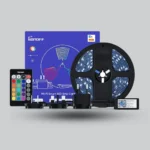
SONOFF L2 2M smart RGB LED light strip
SONOFF L2 2M Smart RGB LED Light Strip Original price was: EGP900.00.Current price is: EGP800.00.

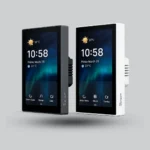
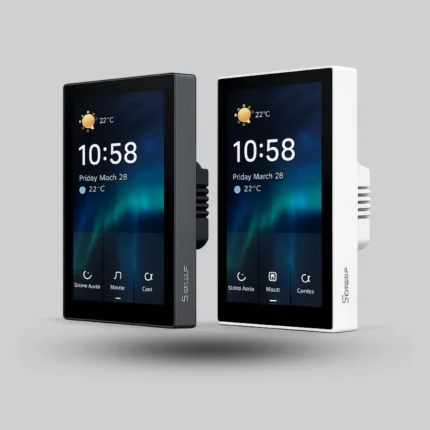
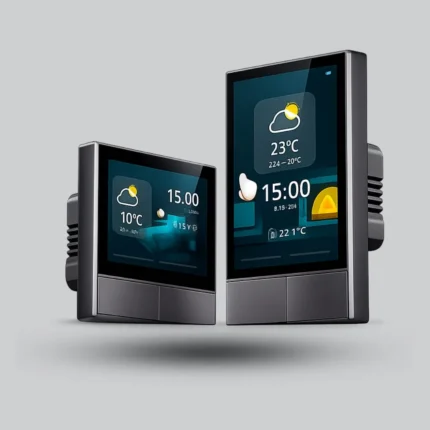
SONOFF NSPanel US – Smart Home Monitor

Original price was: EGP4,400.00.Current price is: EGP3,920.00.

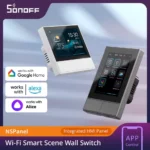
SONOFF NSPanel – Smart wall switch with touchscreen, built-in thermostat, and scene control.
Control all your smart devices from one place. Supports Alexa, Google Assistant, and eWeLink. Sleek design and instant control of lighting, temperature, scenes, and more.

Warranty 7 Years
Description
3.5inchTFT touchscreen
2Relays for two loads
6Thermostat auto-mode periods
2.4GHzWi-Fi network

Features & Design

HMI panel and wall switch

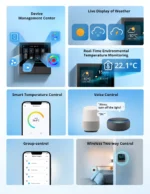
The touchscreen shows devices, groups and manual scenes for control without opening the app, and two manual switches control two loads directly.

Built-in thermostat

Set different indoor temperatures for different periods, and the panel triggers heating or cooling equipment automatically according to your conditions.

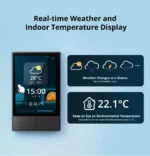
Time and weather

Shows the time, date and day of the week, the outdoor weather and the indoor temperature from the built-in sensor.

Applications

  • Lighting control
  • Heating and cooling control
  • Wake up, work, entertainment and sleep scenes
  • Controlling SONOFF devices such as TX, S31/S40, POWR3 and MINIR2

How does the SONOFF NSPanel smart scene wall switch work?

NSPanel is a control panel with an HMI screen and two switches, a temperature sensor and two relays. It controls two loads as a wall switch and manages devices in your eWeLink account from the screen.

Power on

After installation, on first power-up the device enters Bluetooth pairing mode. To enter it again, hold any button for 5 seconds.

Add it in eWeLink

Tap "+" in the eWeLink app, select Bluetooth pairing and follow the prompts in the app.

Log in

Tap Log in on the screen, then tap "+" and Scan in the app and scan the QR code shown on the panel.

Operating features

Automatic thermostat

The temperature control auto mode supports up to 6 time periods, and temperature can be a trigger in smart scenes to control other devices.

Devices on the screen

Add switches, lights, manual scenes and groups in the app so they appear on the screen for direct control.

Multiple ways to control

The two switches, the touchscreen and the eWeLink app, plus voice control with Alexa, Google Assistant, Alice and Siri Shortcuts.

ImportantWithout internet, the thermostat and screen components stop working, while on/off, power-on state and inching remain available over the local network (LAN).

Specifications & Details

Technical specifications

Product

Brand
SONOFF
Model
NSPanel-EU / NSPanel-US
MCU
ESP32
Color
White

Power and connectivity

Input
100-240V AC 50/60Hz
Max. load
2A per gang / 4A total
Wi-Fi
IEEE 802.11 b/g/n 2.4GHz
Bluetooth
4.2 BLE
App
eWeLink (Android / iOS)

Product details

Screen and sensor

Screen type
TFT, capacitive touch
Screen size
3.5 inch
Resolution
480 x 320 px
Sensor
Built-in temperature sensor

Size and environment

Dimensions
NSPanel-US: 120 x 74 x 41.7 mm / NSPanel-EU: 86 x 86 x 41.7 mm
Net weight
NSPanel-US: 264g / NSPanel-EU: 230g
Applicable place
Indoor
Working temperature
-10℃~40℃
Working humidity
5%~95% RH, non-condensing

Important technical noteWorks on 2.4GHz Wi-Fi only. The device exits pairing mode after 3 minutes without success; keep it close to the router while pairing.

Installation tips

  1. Power off

    Switch off the power before installing, and do not touch the terminals while the device is powered.

  2. Professional electrician

    The device should be installed and maintained by a professional electrician; make sure all wires are connected correctly.

  3. Circuit breaker

    A suitable circuit breaker must be provided as part of the building installation.

  4. Restart

    To restart the device, poke the small hole at the bottom with a needle.

Power off

Switch off the power before installing, and do not touch the terminals while the device is powered.

Professional electrician

The device should be installed and maintained by a professional electrician; make sure all wires are connected correctly.

Circuit breaker

A suitable circuit breaker must be provided as part of the building installation.

Restart

To restart the device, poke the small hole at the bottom with a needle.

Frequently Asked Questions

Can temperature trigger other devices?

Yes, temperature can be a trigger in smart scenes to control other devices on the same account, and so can the status of the two channels.

Does it work without internet?

It still works as a regular wall switch and on/off stays available over LAN, but the thermostat and screen components need the server.

Which voice assistants are supported?

Alexa, Google Assistant, Alice and Siri Shortcuts.

Reviews (0)

Reviews

There are no reviews yet.

Be the first to review “SONOFF NSPanel US – Smart Home Monitor”

Your email address will not be published. Required fields are marked *