Amazon Echo Dot (4th Generation) Speaker with Clock and Alexa – Completely New Design
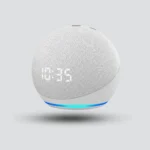
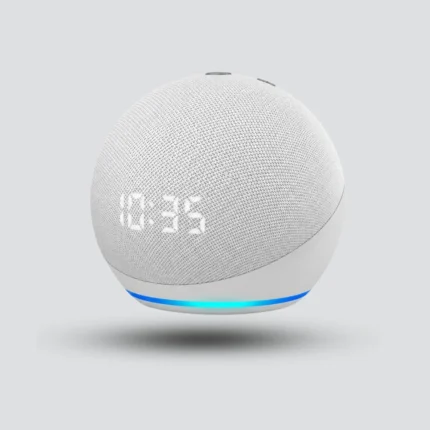
The Echo Dot 4th Generation with Clock is a sleek smart speaker in “Glacier White.” Perfect for your bedside table, it features an LED display to show the time and alarms, with a tap-to-snooze function. It delivers full sound with clear tones and balanced bass. Use Alexa to play music, control your smart home, make calls, and more—all with your voice.
Features & Design
The integrated LED display shows the time on the front of the speaker, plus alarm and timer information, with Tap to Snooze for supported alarms.
Ask questions, check the weather, set cooking timers, create alarms or request music from compatible services, using your voice.
A compact, space-saving spherical design for a bedside table, shelf or desk, with a 1.6-inch speaker for music and podcasts.
Applications
- Bedrooms and bedside tables
- Living rooms
- Office desks
- Voice control of your smart home
How does the Echo Dot 4th Generation with Clock work?
The Echo Dot 4th Generation with Clock combines Alexa, a built-in LED clock display and an integrated speaker, and is set up with the Amazon Alexa app on a compatible smartphone.
Connect power
Connect the speaker to its power adapter, then open the Amazon Alexa app on a compatible smartphone.
Set up in the app
The app guides you through connecting the device to your Amazon account and an available Wi-Fi network.
Customize and use
Customize the speaker name and room, configure alarms and music services, and connect supported smart home products.
01Connect power
Connect the speaker to its power adapter, then open the Amazon Alexa app on a compatible smartphone.
02Set up in the app
The app guides you through connecting the device to your Amazon account and an available Wi-Fi network.
03Customize and use
Customize the speaker name and room, configure alarms and music services, and connect supported smart home products.
Operating features
Smart home voice control
Control supported smart home products through Alexa, including certain smart lights, plugs and switches.
Calling and Announcements
Voice calling between compatible contacts, Drop In between approved Echo devices, and Announcements to supported Echo devices in the household.
Bluetooth and 3.5mm output
Bluetooth connectivity with compatible devices, plus a 3.5mm audio output for suitable external audio equipment.
Smart home voice control
Control supported smart home products through Alexa, including certain smart lights, plugs and switches.
Calling and Announcements
Voice calling between compatible contacts, Drop In between approved Echo devices, and Announcements to supported Echo devices in the household.
Bluetooth and 3.5mm output
Bluetooth connectivity with compatible devices, plus a 3.5mm audio output for suitable external audio equipment.
ImportantSome smart home products require their own gateway, application or additional setup, and some services vary by region and account.
Specifications & Details
Technical specifications
Product
- Brand
- Amazon
- Product Name
- Echo Dot with Clock
- Generation
- 4th Generation
- Voice Assistant
- Amazon Alexa
Display and sound
- Display
- LED Clock Display
- Speaker
- 1.6-inch (41 mm)
- Audio Output
- 3.5mm Audio Output
- Snooze
- Tap to Snooze
- Controls
- Voice Commands and Built-In Buttons
Product details
Connectivity and privacy
- Wi-Fi
- Dual-Band 2.4GHz and 5GHz
- Bluetooth
- Supported
- Companion App
- Amazon Alexa App
- Privacy
- Microphone-Off Button
Size and power
- Dimensions
- Approximately 100 × 100 × 89 mm
- Power Adapter
- 15W Power Adapter
- Design
- Compact spherical
Important technical noteCompatibility with Alexa does not automatically mean that all smart home technologies work directly with the speaker; some devices may require a suitable hub or controller.
Installation tips
- Pick the spot
Place it on a bedside table, living room shelf or office desk to check the time at a glance.
- Power and setup
Connect it to its power adapter and use the Amazon Alexa app to link it to your Amazon account and Wi-Fi.
- Add smart devices
Confirm compatibility with the smart home devices you want to control before connecting them.
- Review privacy
Review your Alexa privacy settings after setup, particularly when enabling communication between devices.
01Pick the spot
Place it on a bedside table, living room shelf or office desk to check the time at a glance.
02Power and setup
Connect it to its power adapter and use the Amazon Alexa app to link it to your Amazon account and Wi-Fi.
03Add smart devices
Confirm compatibility with the smart home devices you want to control before connecting them.
04Review privacy
Review your Alexa privacy settings after setup, particularly when enabling communication between devices.
Frequently Asked Questions
What does the display show?
The LED display shows the time on the front of the speaker, plus supported alarm and timer information.
Can I connect external audio equipment?
Yes. It includes a 3.5mm audio output for suitable external audio equipment, and supports Bluetooth with compatible devices.
Can the microphones be turned off?
Yes. A dedicated microphone-off button gives you a direct way to disable the microphones.
Related products
Amazon Alexa Echo Dot 4th Gen Smart Speaker
Amazon Echo Show 11 with Adjustable Stand (2025 Edition)
MOES Tuya ZigBee WiFi Smart IR Remote Control

Reviews
There are no reviews yet.