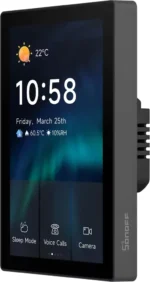
SONOFF NSPanel Pro 120 – Smart Home Monitor

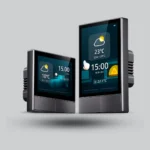
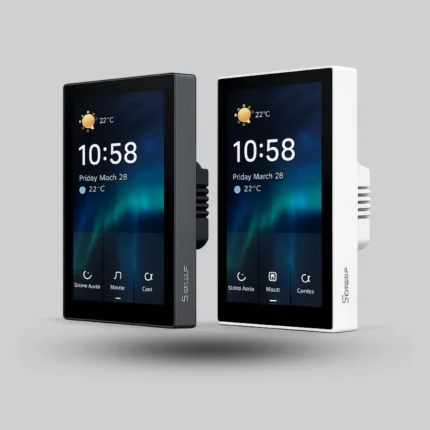
NSPanel Pro 120 Smart Home Monitor is a central control panel with a 4.7-inch capacitive touchscreen, a built-in Zigbee 3.0 hub and a Matter controller. Manage smart devices, camera feeds and security modes from one screen through the eWeLink app, with Alexa and Google Home voice control.

Warranty 7 Years
Description
4.7inchCapacitive touchscreen
750×1334Screen resolution
Zigbee3.0Built-in hub
3Security modes

Features & Design

Built-in Zigbee 3.0 hub

Add Zigbee devices such as motion and door/window sensors and smart plugs, and control them by voice via Amazon Alexa and Google Home or in the eWeLink app.

Matter Hub / Controller

Works as a Matter controller to add Matter switches, sockets and sensors from different manufacturers to the eWeLink app and manage them in one place.

Home security

3 security modes: Home, Away and Sleep. When a linked sensor is triggered, the panel sounds an alarm and sends a notification to your phone.

Applications

  • Controlling smart home devices from a single screen
  • Building a protection and alert system
  • Tracking the energy use of compatible devices
  • Monitoring cameras and answering visitors

How does the SONOFF NSPanel Pro 120 control panel work?

A smart control panel combining a touchscreen, Zigbee and Matter hub and security features; devices are added as widgets on the screen and controlled directly or via smart scenes in eWeLink.

Installation

Power off, then have a professional electrician mount the panel in a 120-type electrical box, connecting the neutral (N) and live (L) wires.

Setup and login

After powering on, tap Start, choose language, region and Wi-Fi, then tap Log in and scan the QR code on the screen with the eWeLink app.

Add devices

Enter pairing mode on the panel or in the app and add Zigbee devices within 180 seconds; sync Wi-Fi devices via Extended Screen Settings.

Operating features

Cameras and voice calls

Shows live views from 4 types of cameras and supports two-way voice calls with the built-in microphone and speaker.

Energy monitoring

Select devices with energy statistics to track their daily energy consumption over a week with charts.

Interface and integration

Custom backgrounds and widget layout, plus Node-RED, Homebridge, Open API and Partial Sync Add-ons, weather clock, PIN code, guest mode and reminders.

ImportantThe panel has no relay and does not support direct load control; it controls the smart devices added to it. Security functions work after security sub-devices are added.

Specifications & Details

Technical specifications

Screen and processor

Screen
4.7" capacitive, multi-touch
Resolution
750x1334
CPU
Quad-core ARM Cortex-A35
SoC
RK3326-S

Connectivity and integration

Wi-Fi
IEEE 802.11 b/g/n 2.4GHz
Zigbee
3.0 (Hub / Router)
Matter
Matter Hub / Controller
App
eWeLink
Voice control
Amazon Alexa / Google Home

Product details

Audio and sensors

Speaker
7Ω, 1W
Microphone
Two digital microphones
Light sensor
Auto brightness by ambient light
Cameras
SONOFF / RTSP / ESP32 / eWeLink Camera

Power and installation

Rating
100-240V~ 50/60Hz, 5W MAX
Wall box
120-type
Dimensions
122.5x74.5x39.5mm
Net weight
221g
Operating conditions
0°C-40°C, 5%~90% RH, indoor

Important technical noteIndoor use, below 2000m altitude. The screen supports landscape and portrait orientation and shows up to 12 devices in landscape and 10 in portrait.

Installation tips

  1. Power off

    Installation and maintenance must be done by a professional electrician; never touch the terminals while power is on.

  2. 120-type box

    The 120 version is made for 120-type electrical boxes and needs a neutral (N) and a live (L) wire at 100~240V.

  3. Non-combustible wall

    Install the panel in a concrete wall or other non-combustible location.

  4. Circuit breaker

    A suitable circuit breaker must be part of the building's electrical installation.

Power off

Installation and maintenance must be done by a professional electrician; never touch the terminals while power is on.

120-type box

The 120 version is made for 120-type electrical boxes and needs a neutral (N) and a live (L) wire at 100~240V.

Non-combustible wall

Install the panel in a concrete wall or other non-combustible location.

Circuit breaker

A suitable circuit breaker must be part of the building's electrical installation.

Frequently Asked Questions

Does the panel have a relay?

No. It has no relay and does not control loads directly; it is a smart home control panel.

Which cameras are supported?

4 types: SONOFF Camera, RTSP Camera, ESP32 Camera and the eWeLink Camera app.

Does it support Matter devices from other brands?

Yes. The NSPanel Pro 120 works as a Matter controller to add Matter switches, sockets and sensors from different manufacturers to eWeLink.

Reviews (0)

Reviews

There are no reviews yet.

Be the first to review “SONOFF NSPanel Pro 120 – Smart Home Monitor”

Your email address will not be published. Required fields are marked *