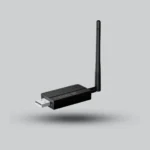
AVATTO GW70 Zigbee Thread USB Dongle with External Antenna
AVATTO GW70 ZigBee/Thread USB Dongle EFR32MG24 Original price was: EGP3,220.00.Current price is: EGP2,800.00.
Back to products
levana k1
Levana K1i Black Fingerprint Smart Door Lock Original price was: EGP10,530.00.Current price is: EGP9,400.00.

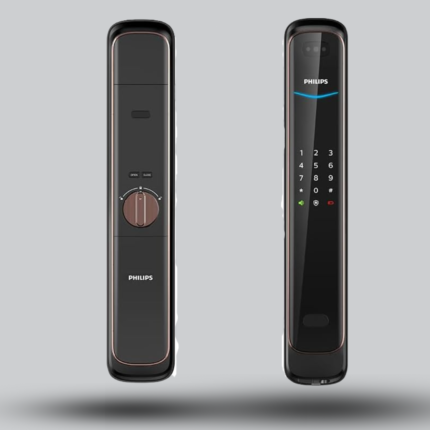
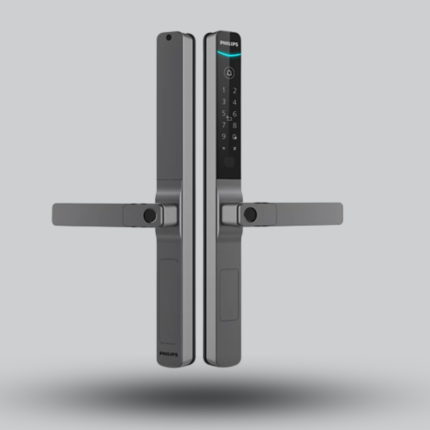
Philips DDL611-18HBS Double-Sided Fingerprint Smart Door Lock

Original price was: EGP26,400.00.Current price is: EGP24,000.00.

Product Manual

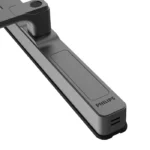
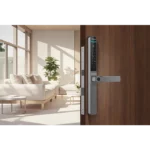
The Philips DDL611-18HBS is a slim smart door lock designed for narrow-frame doors, featuring double-sided fingerprint access, PIN code, key tag and mechanical key unlocking. Its 32 mm narrow profile fits doors with a thickness of 25–70 mm, while Home Access app connectivity through a compatible gateway enables access records, alerts and temporary visitor PIN management.

2 in stock

SKU: 10001113 Categories: ,
Description
32mmNarrow side profile
25–70mmDoor thickness
100Fingerprints, master included
6monthsBattery life (internal test)

Features & Design

Double-sided fingerprint

Fingerprint sensors on both the exterior and interior units; a registered fingerprint works on both sides without re-enrolling, which stops intruders from reaching in.

32 mm narrow profile

Made for narrow-frame doors 25–70 mm thick, including aluminum, thermal-break aluminum, sliding and courtyard doors.

Temporary visitor PIN codes

After connecting the gateway and binding the app, create and share temporary PIN codes remotely: one-time codes valid for 6 hours, recurring codes or time-limited codes.

Applications

  • Aluminum and thermal-break aluminum doors
  • Sliding and courtyard doors
  • Homes and businesses
  • Guest access with temporary PIN codes

How does the double-sided fingerprint smart lock work?

From outside it opens by fingerprint, PIN code, key tag or mechanical key; from inside by fingerprint, smart key or mechanical key. It works with the Home Access app through a compatible gateway.

Verify yourself

Touch the keypad and enter your PIN followed by [#], place an enrolled finger on the sensor, or place the key tag on the recognition area.

Press the handle

After the "Door opened" voice prompt, push the handle down to open the door.

Lock the door

After closing the door, lift the lever upward to engage the latch bolt and complete locking, from outside or inside.

Operating features

Dual verification

In dual verification mode the door opens with any two of fingerprint, PIN code or key tag; in general mode any enrolled method opens it.

Duress (emergency) alert

Using a pre-set duress unlock method (fingerprint or PIN code) makes the lock instantly alert the administrator's app and authorized shared users.

Instant alerts

Tamper, system locking and low battery alerts are pushed to the app; after 5 wrong attempts within 5 minutes the lock is locked for two minutes.

ImportantUse the mechanical key only in emergencies. If the battery is low, a 5V power bank on the emergency port of the exterior unit powers the lock; replace the batteries promptly afterwards.

Specifications & Details

Technical specifications

Design

Model
DDL611-18HBS / DDL611LKTKB/00
Color
Sky Gray
Handle
Lever Handle
Main Material
Aluminum Alloy

Access and capacity

Unlocking Methods
Fingerprint • PIN • Key Tag / Card • Mechanical Key
Fingerprint Capacity
Up to 100 including the master fingerprint
Key Tag / Card Capacity
Up to 100
Master PIN
1
User PIN Capacity
Up to 20 including one-time codes and the master PIN

Product details

Power

Power Supply
4 × AAA Batteries
Battery Type
Alkaline Batteries
Time of Use
6 months (internal test)
Maximum Battery Capacity
8 Batteries

Installation

Narrow-Side Design
32 mm
Door Thickness
25–70 mm / Other Range
Opening Direction
Right or left, inward or outward
Fingerprint Sensor
Semiconductor
Door Types
Aluminum, thermal-break, sliding, courtyard

Important technical noteThe 32 mm figure is an actual measurement with a ±2 mm tolerance. Up to 10 unique one-time codes can be generated within 1 hour; battery life of 6 months is internal test data and varies with use.

Installation tips

  1. Check door thickness

    The lock suits narrow-frame doors 25–70 mm thick; for doors outside this range, consult an authorized dealer or customer care center.

  2. Door swing direction

    It fits four swing directions, left or right, inswing or outswing; adjust the lever and latch direction for your door before fitting.

  3. Professional installation

    Philips advises professional installation following its instructions, and keeping the lock away from areas where water may leak or splash.

  4. After installation

    Enroll a master fingerprint, change the default master PIN code immediately and store the mechanical key in a secure place outside the home.

Check door thickness

The lock suits narrow-frame doors 25–70 mm thick; for doors outside this range, consult an authorized dealer or customer care center.

Door swing direction

It fits four swing directions, left or right, inswing or outswing; adjust the lever and latch direction for your door before fitting.

Professional installation

Philips advises professional installation following its instructions, and keeping the lock away from areas where water may leak or splash.

After installation

Enroll a master fingerprint, change the default master PIN code immediately and store the mechanical key in a secure place outside the home.

Frequently Asked Questions

Does the lock need a gateway?

Yes. Connecting to the network to view records and alerts in the Home Access app, and creating temporary visitor PIN codes, require a compatible gateway.

Do I enroll fingerprints on both sides?

No. A fingerprint enrolled on the front reader also works on the rear reader without re-enrolling.

What if the battery runs out?

Connect a 5V power bank to the emergency port to power the lock and open the door, then replace the batteries; the mechanical key is also available.

Reviews (0)

Reviews

There are no reviews yet.

Be the first to review “Philips DDL611-18HBS Double-Sided Fingerprint Smart Door Lock”

Your email address will not be published. Required fields are marked *