

EZVIZ DL05 Smart Fingerprint Lock with Wi-Fi, Bluetooth and App Control
EGP13,610.00 Original price was: EGP13,610.00.EGP12,150.00Current price is: EGP12,150.00.
Product Manual
- DL05_Datasheet_compressed
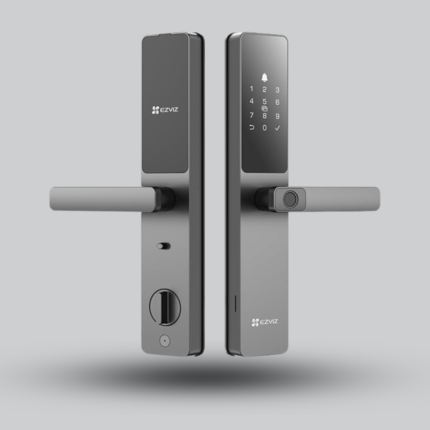
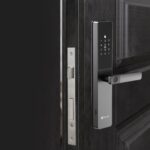
EZVIZ DL05 is a smart fingerprint lock designed for easy and secure keyless entry, with multiple unlocking methods including fingerprint, passcode, proximity card, mechanical key, Bluetooth key, and EZVIZ App control, plus real-time alerts, built-in doorbell, and anti-tamper alarm.
2 in stock
Features & Design
Simply grip the handle so your fingertips rest on the fingerprint scanner and you are in. Up to 50 fingerprints are processed and stored locally on the lock.
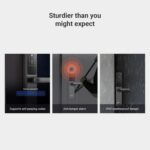
Unlock remotely, share a Bluetooth key with family and create temporary passcodes for visitors, and get notified when the door opens, the battery is low or someone tries to remove the lock or force entry.
Linked with a compatible EZVIZ indoor camera, each door-opening event can trigger auto-recording, so you know when the door opened and who entered.
Applications
- Homes, apartments and modern doors
- Daily fingerprint access for family members
- Temporary access codes for visitors
- Integration with compatible EZVIZ cameras
How does the smart lock work?
The lock verifies a fingerprint, passcode or proximity card; after the voice prompt you press the handle down to open the door. It connects over 2.4GHz Wi-Fi and Bluetooth to the EZVIZ App for user management and alerts.
Insert the batteries
After installation, remove the battery cover on the rear panel, insert 8 AA batteries, then tighten the cover.
Add the lock to the app
Press and hold the SET button on the rear panel until a voice prompt sounds and key 0 flashes, then tap "+" in the EZVIZ App, scan the QR code on the battery slot and follow the wizard.
Add admin and fingerprints
Touch the keypad to wake the lock and press "√" to add an administrator, then 1 for a fingerprint (touched 6 times), 2 for a 6-10 digit passcode or 3 for a card.
01Insert the batteries
After installation, remove the battery cover on the rear panel, insert 8 AA batteries, then tighten the cover.
02Add the lock to the app
Press and hold the SET button on the rear panel until a voice prompt sounds and key 0 flashes, then tap "+" in the EZVIZ App, scan the QR code on the battery slot and follow the wizard.
03Add admin and fingerprints
Touch the keypad to wake the lock and press "√" to add an administrator, then 1 for a fingerprint (touched 6 times), 2 for a 6-10 digit passcode or 3 for a card.
Operating features
Unlocking methods
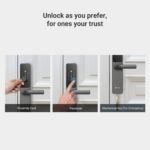
Fingerprint, passcode, proximity card, mechanical key, Bluetooth key through the app, temporary codes and remote unlocking through the EZVIZ App.
Privacy mode and child lock
In privacy mode only the administrator, or anyone with the mechanical key, can open from outside and alarm sounds are muted. The child lock uses an indoor button to block the inside handle.
Wrong-attempt protection
Five wrong attempts within five minutes lock the system for three minutes. Anti-peeping codes of up to 20 digits let you add extra digits before or after your passcode.
Unlocking methods
Fingerprint, passcode, proximity card, mechanical key, Bluetooth key through the app, temporary codes and remote unlocking through the EZVIZ App.
Privacy mode and child lock
In privacy mode only the administrator, or anyone with the mechanical key, can open from outside and alarm sounds are muted. The child lock uses an indoor button to block the inside handle.
Wrong-attempt protection
Five wrong attempts within five minutes lock the system for three minutes. Anti-peeping codes of up to 20 digits let you add extra digits before or after your passcode.
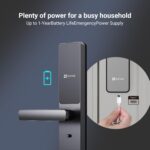
ImportantBattery life of up to 365 days applies over Bluetooth with Wi-Fi disabled at 10 openings per day, and drops with Wi-Fi on. You can switch between Wi-Fi and Bluetooth modes in the app.
Specifications & Details
Technical specifications
Product
- Brand
- EZVIZ
- Model
- DL05
- Color
- Metallic Grey
- Panel Material
- Aluminum Alloy
Unlocking and capacity
- Unlocking Methods
- Fingerprint / Passcode / Proximity Card / Mechanical Key / Bluetooth Key / Temporary Codes / Remote Unlock
- Capacity
- 50 users / 50 fingerprints / 50 passcodes / 50 cards
- Anti-Peeping Codes
- Up to 20 digits
- Wrong-Attempt Protection
- 5 failed attempts in 5 minutes = 3 minutes lockout
- Handle Operation
- Press down to unlock / lift up to lock
Product details
Connectivity and security
- Connectivity
- 2.4GHz Wi-Fi / Bluetooth
- Weatherproof
- IP65 (front panel)
- Security Features
- Anti-tamper alarm / Child safety lock / Privacy mode
- Notifications
- Door opened / Low battery / Lock removal attempt
Power and installation
- Power Supply
- 8 × AA 1.5V Alkaline Batteries
- Emergency Charging
- Type-C
- Panel Size
- 360 × 67 × 27 mm
- Door Thickness
- 5085: 30–110 mm / 6068: 40–120 mm
- Working Temperature
- -25°C to 70°C
Important technical noteOperating humidity: 10% to 95%; only the exterior panel is weather-resistant. Each user can have up to 5 fingerprints, 1 passcode and 1 card. The lock has a built-in doorbell, and the anti-tamper alarm sounds for about one minute.
Installation tips
- Check the lock body version
The lock comes in 5085 and 6068 lock body versions, so confirm the version, door thickness and installation requirements before ordering.
- Professional installation
It is recommended to let a professional install the lock and drill the holes according to the supplied hole template.
- Pick the square rod length
Measure the door thickness and pick the matching square rod: its length equals the door thickness plus 10 mm to 35 mm.
- Before first use
Remove the protective film before first use. If your home is under decoration, remove the lock and reinstall it afterwards.
01Check the lock body version
The lock comes in 5085 and 6068 lock body versions, so confirm the version, door thickness and installation requirements before ordering.
02Professional installation
It is recommended to let a professional install the lock and drill the holes according to the supplied hole template.
03Pick the square rod length
Measure the door thickness and pick the matching square rod: its length equals the door thickness plus 10 mm to 35 mm.
04Before first use
Remove the protective film before first use. If your home is under decoration, remove the lock and reinstall it afterwards.
Frequently Asked Questions
What if the batteries run out?
Connect a power bank to the emergency power port on the front panel with a Type-C cable to charge the lock, then unlock the door. The mechanical key is also available for emergencies.
Which door thickness does it fit?
30 to 110 mm for the 5085 version and 40 to 120 mm for the 6068 version, so confirm the lock body version before installation.
Can visitors get temporary access?
Yes. You can generate a temporary access code for visitors in the EZVIZ App, and share a Bluetooth key with family members.
Related products
Catchface R7 TY Fingerprint Smart Lock
Cordless CL-15: Advanced Smart Lock for Aluminum & Alumetal Doors
Lezn i19 Face Version Smart Lock – The advanced face of smart security
Philips Alpha-VP-5HWS Smart Video Door Lock
EGP36,950.00 – EGP37,950.00Price range: EGP36,950.00 through EGP37,950.00Philips Smart Lock DDL720-MVP-17HWS Regular Vision
SIB L03B Smart Lock for Iron Doors with Remote, Proximity Card & PIN Code

Reviews
There are no reviews yet.