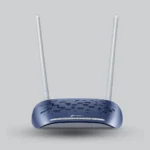
TP-Link TD-W9960 300Mbps VDSL/ADSL Wireless N Modem Router

TP-Link TD-W9960 is a powerful VDSL/ADSL modem router with 300Mbps Wi-Fi speed, dual antennas, 4 LAN ports, lightning protection, and full control via the Tether app—ideal for home and office use.

Warranty 1 Year
SKU: 60001008 Categories: ,
Description
300MbpsWi-Fi speed on 2.4GHz
100MbpsMax. VDSL speed
2External 5dBi antennas
6kVLightning protection

Features & Design

Modem and router in one

Combines a VDSL/ADSL modem and a Wi-Fi router, compatible with VDSL2, ADSL2+, ADSL2 and ADSL, and also works with fiber or cable internet access.

VDSL and Wi-Fi speeds

VDSL speeds of up to 100Mbps in both upstream and downstream directions, plus Wi-Fi of up to 300Mbps on 2.4GHz for HD streaming and online gaming.

6kV protection, secure surfing

6kV lightning protection against electrical damage from thunderstorms, plus parental controls, a separate guest network and WPA/WPA2 encryption.

Applications

  • Homes and offices with VDSL/ADSL internet lines
  • HD video streaming
  • Online gaming
  • Family networks needing parental controls and a guest network

How does the VDSL/ADSL modem router work?

The device receives internet from a VDSL/ADSL line through its RJ11 port, or from a fiber or cable modem through its LAN/WAN port, then shares it over 2.4GHz Wi-Fi and wired LAN ports.

Connect your internet line

Connect the VDSL/ADSL line to the RJ11 port, or connect a fiber or cable modem to the LAN/WAN port.

Complete the setup

Set up the device in minutes from the web interface or the TP-Link Tether app on Android or iOS devices.

Manage your network

Control network settings, including parental controls and access control, from the Tether app whenever and wherever you are.

Connect your internet line

Connect the VDSL/ADSL line to the RJ11 port, or connect a fiber or cable modem to the LAN/WAN port.

Complete the setup

Set up the device in minutes from the web interface or the TP-Link Tether app on Android or iOS devices.

Manage your network

Control network settings, including parental controls and access control, from the Tether app whenever and wherever you are.

Operating features

Bandwidth control

IP-based Bandwidth Control (IP QoS) to manage the bandwidth of connected devices, with WMM support.

Wi-Fi schedule and WPS

Turn the Wi-Fi radio on or off on a preset timetable, and set up an encrypted wireless connection at the push of the WPS button.

Operating modes and IPv6

Works as a VDSL/ADSL modem router or a wireless router, and supports IPv4, IPv6 and IPSec VPN pass-through.

Bandwidth control

IP-based Bandwidth Control (IP QoS) to manage the bandwidth of connected devices, with WMM support.

Wi-Fi schedule and WPS

Turn the Wi-Fi radio on or off on a preset timetable, and set up an encrypted wireless connection at the push of the WPS button.

Operating modes and IPv6

Works as a VDSL/ADSL modem router or a wireless router, and supports IPv4, IPv6 and IPSec VPN pass-through.

ImportantListed speeds are maximum rates derived from IEEE 802.11 specifications; actual speed and coverage are not guaranteed and vary with network conditions, building materials and internet service provider factors.

Specifications & Details

Technical specifications

Product

Model
TD-W9960
Brand
TP-Link
Device Type
Wireless VDSL/ADSL modem router
DSL Standards
VDSL2 / ADSL2+ / ADSL2 / ADSL

Wireless

Standard
IEEE 802.11b, 802.11g, 802.11n
Speed
300Mbps at 2.4GHz
Frequency
2.400-2.4835GHz
Antennas
2 × 5dBi external, fixed, omni-directional
Encryption
WEP 64/128-bit / WPA/WPA2

Product details

Ports and power

Ports
3 × LAN + 1 × LAN/WAN (10/100Mbps) + 1 × RJ11
Buttons
WPS / Reset / Power On/Off
Power Supply
9VDC/0.6A
Dimensions
181.6 × 129.7 × 36.2 mm

Software and environment

Security
NAT Firewall / SPI Firewall / DoS Protection
Quality of Service
WMM / IP QoS
Protocols
IPv4 / IPv6
Operating Temperature
0 to 40 °C
Operating Humidity
10% ~ 90% non-condensing

Important technical noteSpecifications are from the official TP-Link page, which lists hardware version V1.20; details for each version are on the support page. Storage temperature is -40 to 70 °C; certification is CE.

Installation tips

  1. Package contents

    The device, an external DSL splitter, an RJ-11 DSL cable, an RJ-45 Ethernet cable, a quick installation guide and a power adapter.

  2. Power supply

    Runs on a 9VDC/0.6A power adapter and can be switched on or off with the Power On/Off button.

  3. Wired devices

    Connect computers, TVs and game consoles to the 10/100Mbps LAN ports.

  4. Operating environment

    Place the device where the operating temperature is 0 to 40 °C and humidity is 10% to 90% non-condensing.

Package contents

The device, an external DSL splitter, an RJ-11 DSL cable, an RJ-45 Ethernet cable, a quick installation guide and a power adapter.

Power supply

Runs on a 9VDC/0.6A power adapter and can be switched on or off with the Power On/Off button.

Wired devices

Connect computers, TVs and game consoles to the 10/100Mbps LAN ports.

Operating environment

Place the device where the operating temperature is 0 to 40 °C and humidity is 10% to 90% non-condensing.

Frequently Asked Questions

Does it work with fiber or cable internet?

Yes. Besides the DSL port, it works with fiber or cable internet access through its LAN/WAN port.

Which band does the Wi-Fi use?

The 2.4GHz band only, with speeds of up to 300Mbps using the IEEE 802.11b, 802.11g and 802.11n standards.

Can I manage it from my phone?

Yes, through the TP-Link Tether app, which also gives access to parental control features.

Reviews (0)

Reviews

There are no reviews yet.

Be the first to review “TP-Link TD-W9960 300Mbps VDSL/ADSL Wireless N Modem Router”

Your email address will not be published. Required fields are marked *